
Customer management
Pool Service Software with Built-In CRM for Pool Companies
Manage every customer, property, and piece of equipment in one place. Service history, gate codes, customer communication. Everything your team needs to deliver outstanding pool service.
Profiles
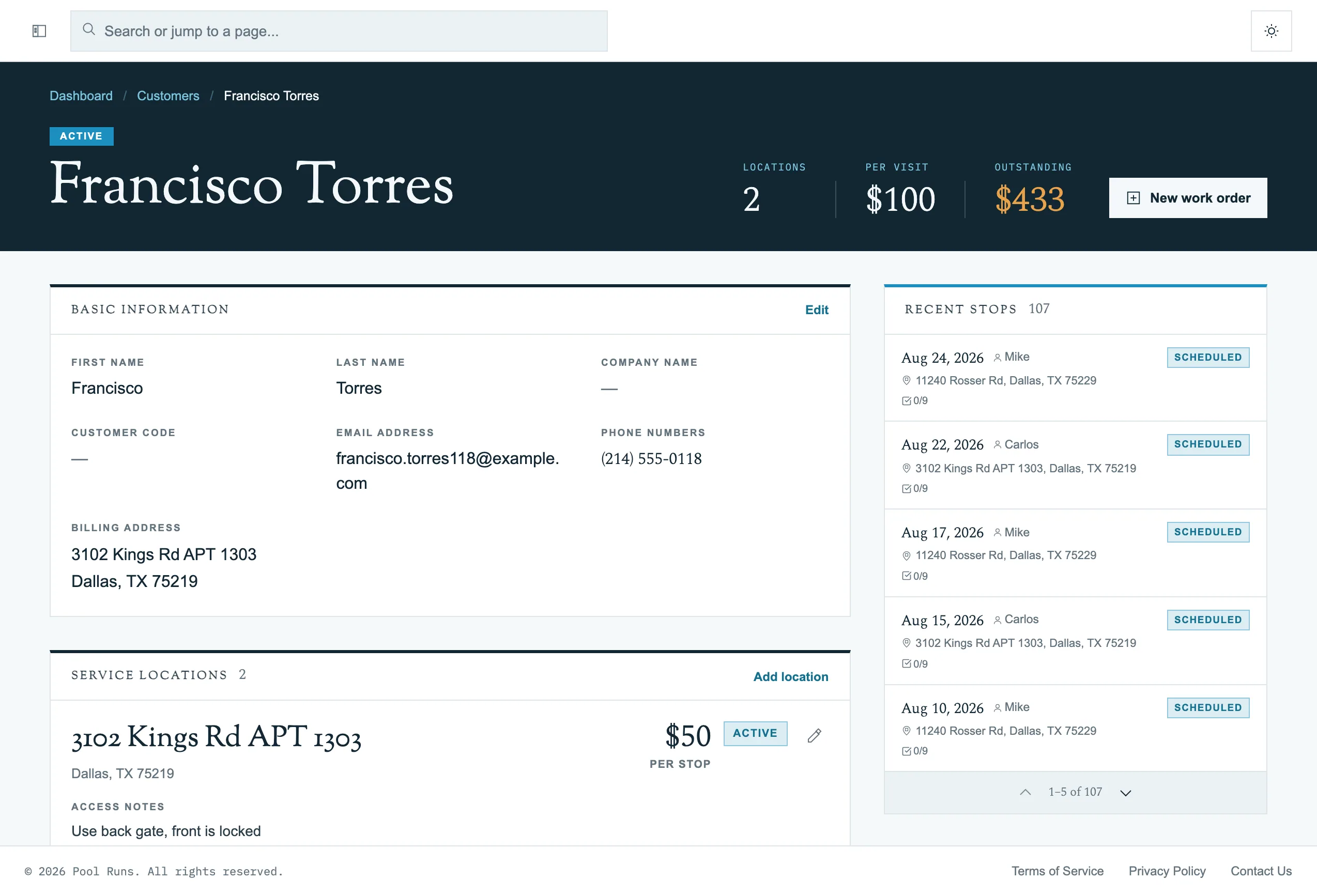
Complete Customer Profiles
Every detail about your customers in one organized view. Contact information, gate codes, access notes, pet warnings, and communication history. Tag customers for easy filtering, add special instructions per property, and make sure your team always shows up prepared.
Multi-property
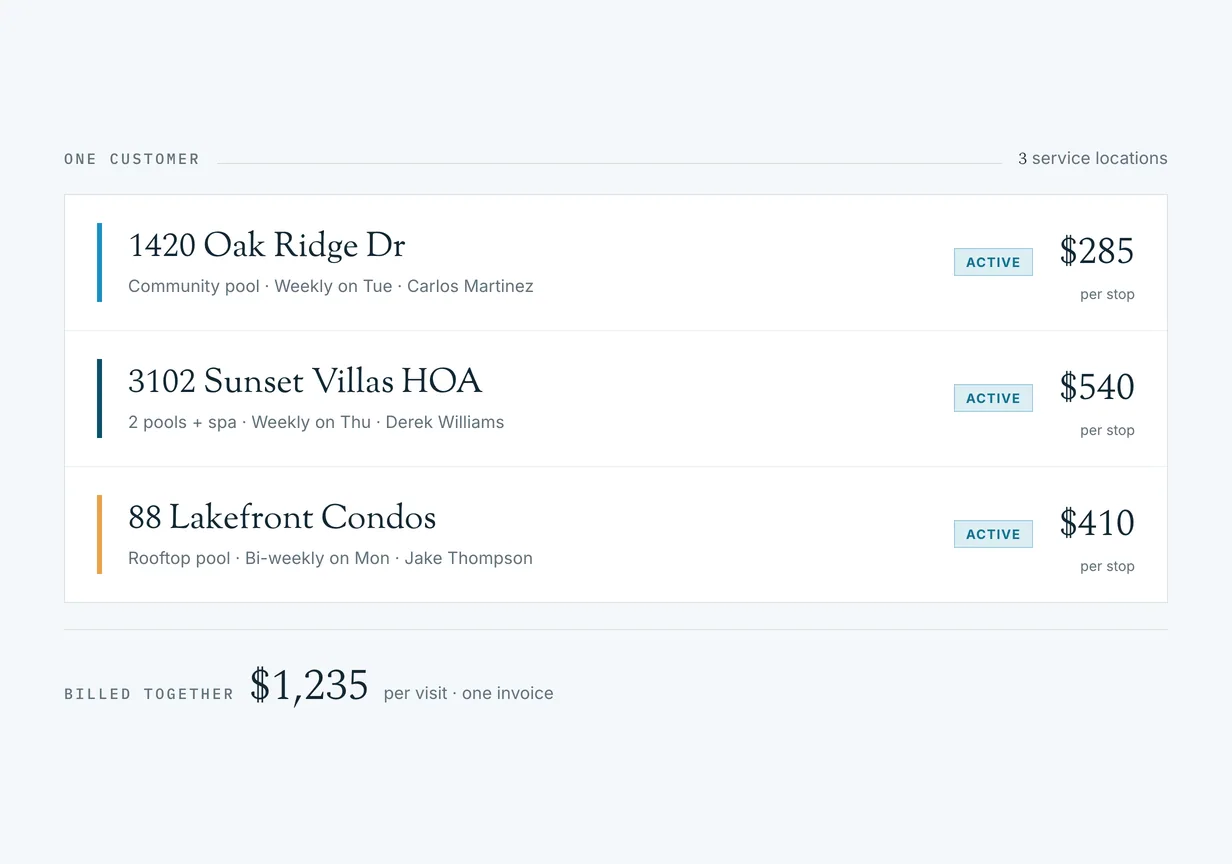
Multi-Property Support
Property managers, commercial accounts, and HOAs often have multiple pools. Pool Runs keeps every property organized under a single customer record, each with its own equipment inventory, service history, and scheduling. One customer, multiple locations, zero confusion.
Equipment
Equipment & Service History
Track every pump, filter, and heater. Log every service visit with photos and chemical readings. Your technicians always know exactly what’s installed and what’s been done.

Communication
Automated Customer Communication
Keep customers informed without lifting a finger. Pool Runs automatically sends service completion emails after every visit, delivers invoice and payment notifications, and lets you email schedule changes or announcements to your whole customer list. All of that is in the base plan. Text messaging is part of the optional Communications add-on.
The difference
Why a Pool Service CRM Is Not a General-Purpose CRM
A general-purpose CRM is built around a contact and a deal that closes once. Pool service is the opposite shape of business: the same work, at the same address, every week, for years. The record that carries the value is not the person who signed up. It is the body of water.
That distinction stops being academic the first time an account does something ordinary. An HOA with three pools is one payer and three service records, each with its own equipment and its own chemistry. A customer stops service, and eight years of filter cleans and heater repairs stay on file with the property. A technician standing at a locked side gate needs the code, the dog warning and last week’s readings on one screen, not a contact card with a notes field somebody was supposed to keep current.
Pool Runs models it the way the work actually runs. The customer is the payer. Underneath sit the properties, and underneath each property sit the equipment, the service history, the photos and the chemical readings. Nothing about that hierarchy is a preference. It is what makes a route reschedule cleanly around a skip, an invoice reconcile against a specific pool, and a new technician cover a route they have never driven.
The record
What Belongs on a Customer Record
Most operators arrive from a spreadsheet, a phone’s contacts app and a glovebox notebook, and the migration question is always the same: what actually has to come across? In practice it is four groups of information, and each one earns its place by answering a question somebody asks in the field.
- Who pays and who is on site. Often two different people. The billing contact receives the invoice; the on-site contact is who you call when a gate is padlocked.
- How to get in. Gate codes, access notes, pet warnings and per-property instructions. This is the information that turns a fifteen minute stop into a wasted drive when it lives in one person’s head.
- What is installed. Pump, filter and heater, with make, model and install date. Equipment history is what lets you quote a repair without a second trip, and what tells a customer why a part is due.
- What has been done. A dated log of every visit with chemical readings and photos. It settles disputes, it shows a new technician the baseline for a pool they have never seen, and it is the evidence behind every invoice you send.
All four are part of the base Pool Runs plan. See pricing for what the plan includes. If you also want the follow-up automated, with review requests after a visit, sales pipelines and saved segments, that is the optional Engage add-on.
“As someone who’s used other pool service software, Pool Runs feels the most professional and intuitive. Customer profiles, equipment tracking, service history. It’s all laid out exactly how you’d want it.”
Miguel Cordova
Owner, Cordova Pool Care
“After 17 years in the business, I remember documenting customer info in a phone book and keeping a log of what was applied at each pool. With Pool Runs, it’s all in one place. Every customer, every property, every service record.”

Wendy Rutherford
Office Admin, Rutherford Pools
Questions
Frequently Asked Questions
Common questions about pool service CRM software and customer management.
What is a pool service CRM?
A pool service CRM is customer relationship management software designed specifically for pool service companies. It manages customer information, service history, equipment tracking, and communication in one place.
How is a pool service CRM different from a general-purpose CRM?
A general-purpose CRM is built around a contact and a deal that closes once. Pool service is recurring work performed at a physical address, so the record that matters is the property: its equipment, its gate code, its access notes, and everything done there. A pool service CRM keeps that history attached to the property, so it is still there if a customer stops service.
Can Pool Runs handle customers with multiple properties?
Yes, Pool Runs supports multi-property customers. Each property has its own equipment inventory, service history, and scheduling — perfect for property managers and commercial accounts.
What customer information should a pool service business keep on file?
At minimum: the billing contact, the address of every body of water you service, gate or lock codes and access notes, pet warnings, the make, model and install date of the pump, filter and heater, and a dated log of every visit with chemical readings and photos. In Pool Runs each of those lives on the property record, so a technician standing at the gate sees the same information the office does.
Can technicians see customer history in the field?
Yes. The Pool Runs mobile app shows the full property and equipment history on site, and technicians log chemical readings and capture photos from the same screen, including when they are offline.
How does Pool Runs communicate with customers?
Pool Runs sends automated service completion emails after every visit, invoice and payment notifications, and lets you send broadcast emails to your whole customer list for schedule changes or announcements. All of that is in the base plan. Text messaging and the AI Voice Agent are part of the optional Communications add-on.
How much does pool service CRM software cost?
Pool Runs starts at $45/month, which includes 50 properties and the customer, property, equipment and service-history features described on this page. Unlimited users and no per-technician fees. Sales pipelines, opportunity tracking and saved contact segments are part of the optional Engage add-on at $50/month.
What Customer Records Feed Into
Properties, equipment, and service history are the input to almost everything else Pool Runs does.
Get started
Ready to Know Every Customer, Every Pool?
Join pool service professionals who manage their entire customer base with Pool Runs. Customer, property and equipment records are in the base plan at every account size.